My boss tossed me a casual but crucial challenge: could we build a proof of concept for PPE detection?
The context was highly practical. At site entry points across our company group, safety compliance is checked by a person standing at the gate, eyeballing whether workers are wearing their protective equipment before letting them through. It is slow. It is inconsistent. And it depends entirely on whoever happens to be on duty. Miss one person without a hard hat, and that is a safety incident waiting to happen.
If a working prototype could automate that visual check, it would not just be a cool technical demo. It could deploy to every entry point across dozens of sites, covering thousands of workers passing through daily. That is what made this worth building.
Why Not Just Use a Server?
The conventional enterprise approach is straightforward. Set up a server with a dedicated GPU, stream camera feeds to it, run the detection model server side, and send the results back. It is a proven architecture and a well documented path.
But for a proof of concept, it is a wall of friction. You need infrastructure provisioned before you can even test anything. Cloud GPU rental means recurring costs from day one. And there is a massive privacy liability that is hard to ignore: you are sending live camera footage of workers to a remote server. In a company that takes data governance seriously, that conversation alone could stall the project for months.
I needed something that could go from idea to a working demo with as few dependencies as possible.
What If the Browser Was the Computer?
I had been experimenting with machine learning and edge computing on my own time. Through those independent projects, I discovered TensorFlow.js. It is a library that runs trained AI models directly in the browser, using the local device GPU. The exact same chip that renders web pages and plays video can also run neural network inference. No external server is involved.
What started as a hobby turned out to be exactly the right tool for this enterprise problem.
Train a detection model, export it for the browser, and deploy the whole thing as a static site. The entire system becomes a single URL. Open it on any device with a camera and it works. No client installation, no app store approval, no IT provisioning. Ship it, get feedback, and iterate.
And because the detection target lives completely inside the model file rather than the application code, the exact same system can be retrained to detect anything from hard hats to safety goggles to high visibility vests. Swap the model file, redeploy, and you are done.
The architecture was clear. The hard part was building everything in between.
Building the Detection Model
The system needed to detect three core items of personal protective equipment. We did not have proper field equipment readily available yet, so I utilized office stand ins to prove the pipeline works first. Swapping in authentic PPE later would just be a matter of retraining with new photos.
- Glasses (Regular safety glasses): The challenge is they are small, transparent, and easily blocked by the face.
- Vest (Standard office vest): The challenge is detecting a fabric layer over clothing that is visible but not reflective.
- Cap (White cap): The challenge involves identifying headwear consistently positioned at the top of the frame.
When all three items are detected on camera, the screen turns green for Access Granted. Missing any item? The screen stays dark with a clear visual indicator of exactly what is not yet detected.
But before any of that could work, I needed a trained model. And a model requires data.
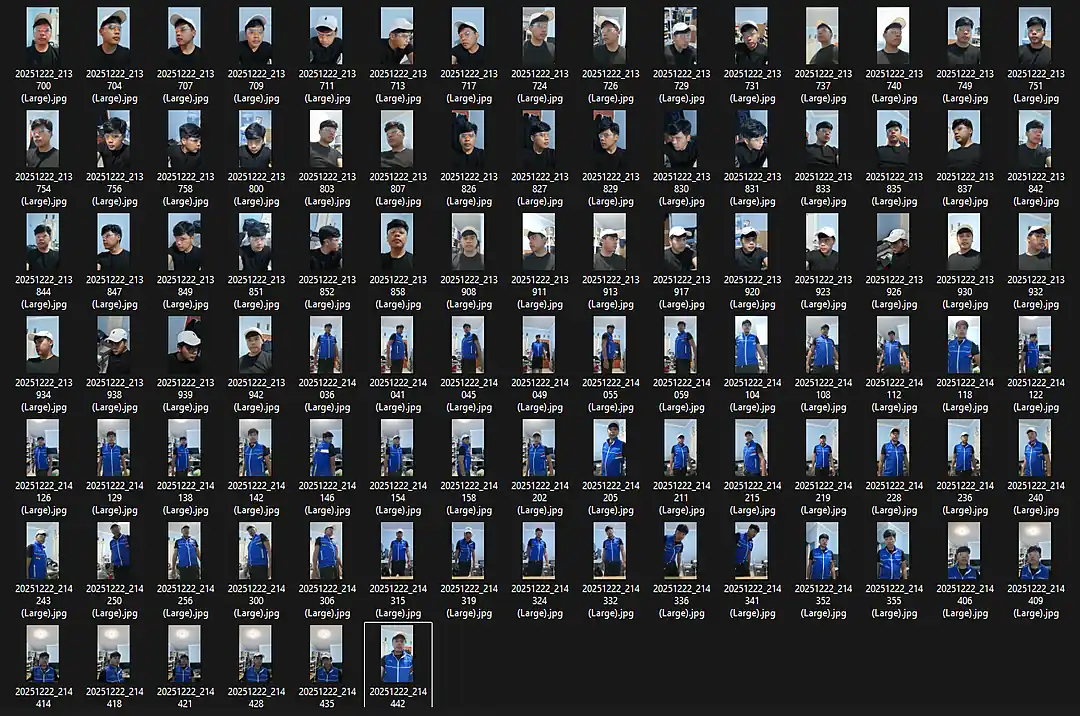
One Evening and 96 Self Portraits
An object detection model needs hundreds of labelled photographs to learn visual patterns. I did not have a specialized dataset, a photography studio, or even another person to help take pictures.
So I grabbed the three items, set up my smartphone camera at home, and started photographing myself in every combination I could think of. All three items on, just two, just one, and none at all. Front facing, side profile, looking up, looking down, close up shots, and wider angles. Every pose I could pull off solo.
The goal was real world messiness. A clean and perfectly lit portrait is trivial for an AI model. A person caught at an awkward angle with glasses resting halfway down their nose is the actual challenge.
The Unglamorous Work of Labelling
Each photograph needed bounding boxes drawn manually around every piece of equipment, meticulously tagged with the correct class: Glasses, Vest, or Cap. Every single box drawn by hand.
There are no shortcuts here. The quality of your labels directly dictates the quality of your model. Sloppy bounding boxes guarantee sloppy AI detections.
Iteration and Overcoming Failure
I fed those initial 96 labelled images into the YOLOv8 Nano architecture and kicked off the training sequence. The first two runs were failures. Precision and recall hovered near zero. The model simply lacked the volume of examples needed to establish visual patterns.
This is the exact moment where you question the entire approach. But the flaw was not the architecture. The flaw was the data volume.
Scaling the Dataset
I pivoted and photographed each item individually, placing them on diverse surfaces across the room. Glasses lying flat on a desk, resting against a monitor, or held in a hand. The vest laid out on the floor, hung on a hanger, or draped over a chair. I captured 192 additional close up shots to provide the model with isolated context for each item.
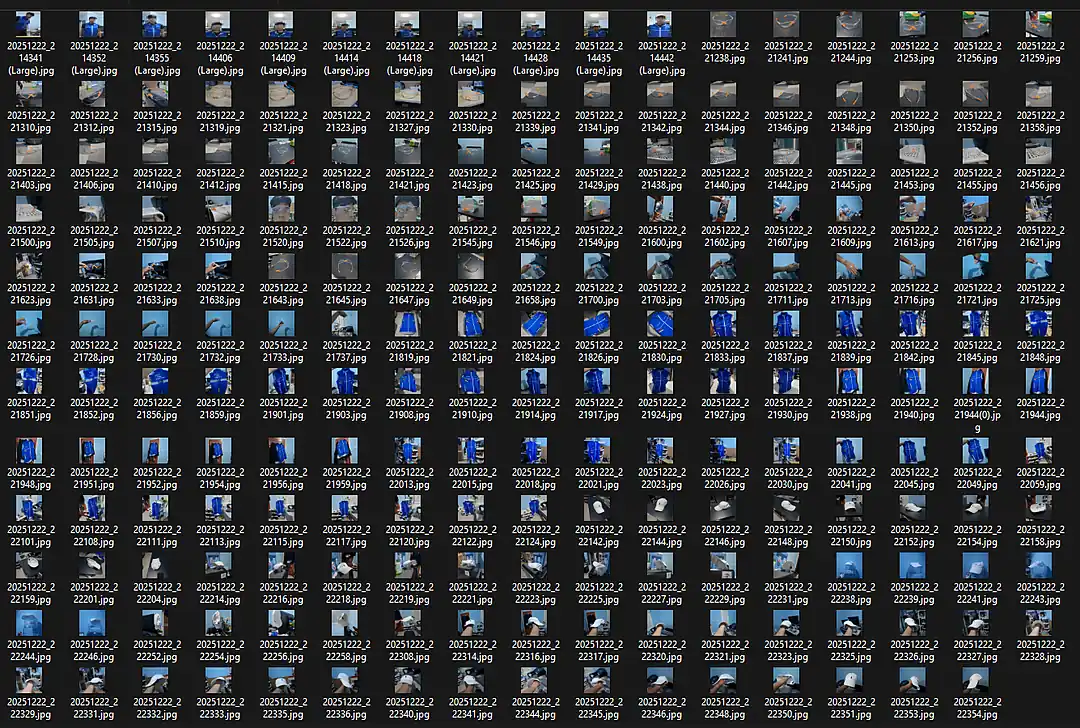
Armed with 288 precisely labelled images, I executed training rounds three and four. The performance jump was definitive.
- Precision: Climbed to 91.4% on the final tuned run.
- Recall: Settled at 45.9%.
- mAP50: Reached 57.4%.
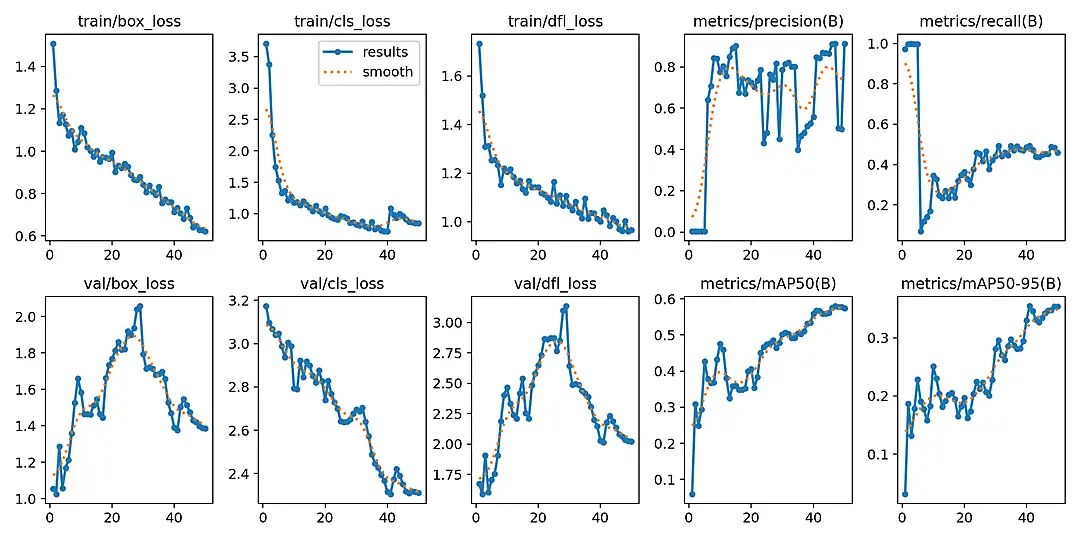
Achieving 91.4% precision on the fourth iteration was the breakthrough. While not flawless, it was mathematically robust enough to prove the business concept. This is not a Kaggle competition. It needs to prove the system works reliably.
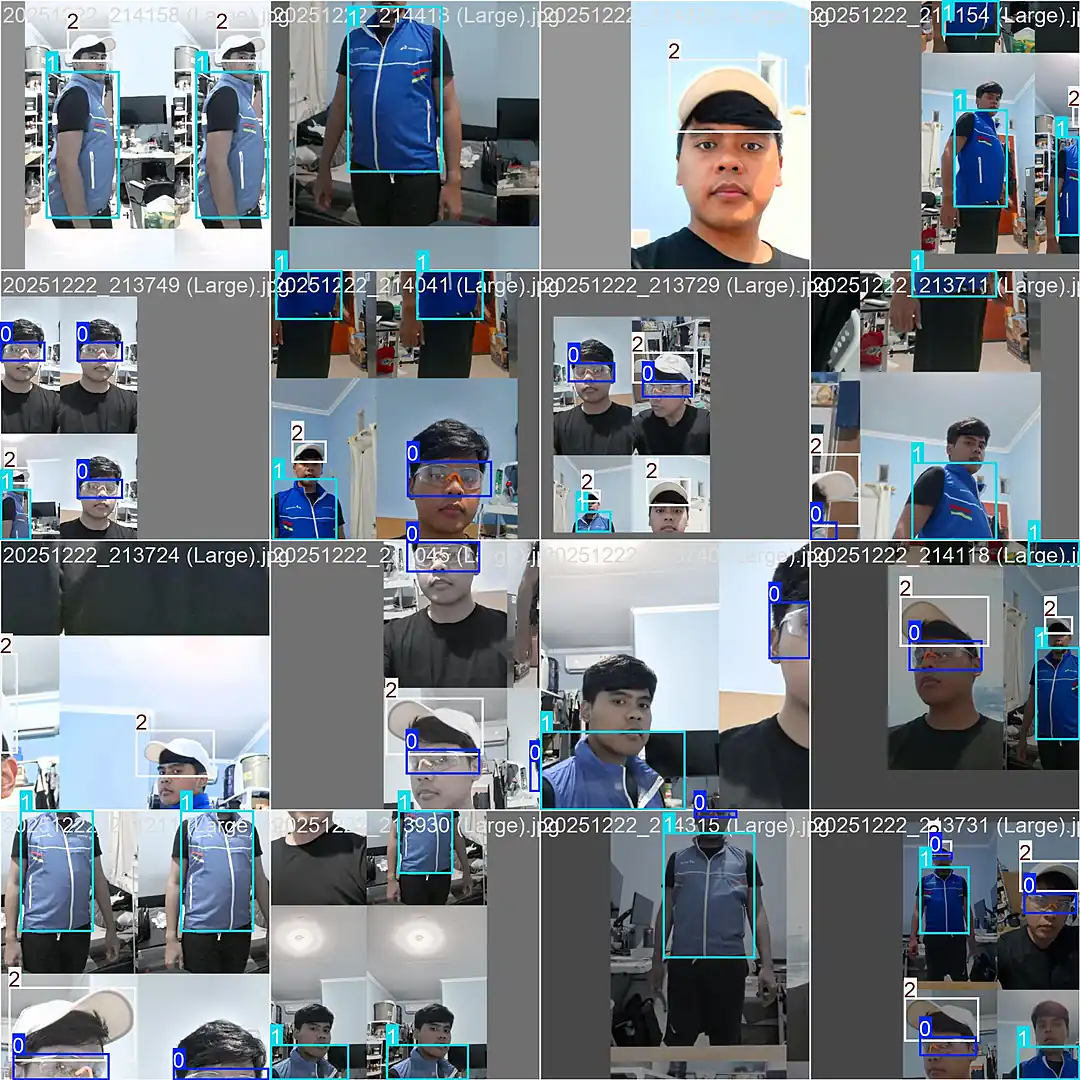
I exported the model into the browser ready TensorFlow.js format. The neural network weights compiled into three binary files totaling just 12MB. It was small enough for an average browser to download in seconds, yet dense enough to remain highly accurate.
Engineering the Browser Experience
Running AI in a browser utilizing a WebGL backend takes the device GPU and repurposes it for local AI inference. Nothing ever leaves the device. Every single frame captured by the webcam is processed through a strict local pipeline. The system captures the frame, resizes it, normalizes the pixels, and runs the inference. It then filters out overlapping detections and draws the final bounding boxes.
The model evaluates 8,400 possible detection regions per frame in real time. Executing this flawlessly required solving two critical engineering hurdles.
Dynamic Confidence Thresholds
Initially, I applied a universal confidence threshold for all three items. It failed immediately. Treating them equally meant either failing to see the glasses entirely or hallucinating caps onto every round object in the room. Tailoring the thresholds solved the accuracy disparity.
- Glasses at 0.20: Small and transparent. A strict threshold causes the system to miss valid detections constantly.
- Vest at 0.50: Without reflective stripes, the model must rely purely on shape and layering context.
- Cap at 0.80: Highly distinct. Anything registering below 80% confidence is likely a false positive.
Hardware Optimization
Processing a neural network inside a browser tab at maximum capacity will rapidly overheat and freeze a standard device. I implemented two essential safeguards to fix this.
First, I capped the system at 12 Frames Per Second. For a worker standing at a security checkpoint, 60 frames per second is computing waste. Throttling the loop saves battery life, keeps fans quiet, and prevents thermal throttling.
Second, I engineered automatic GPU memory cleanup. AI models will leak memory if intermediate calculations are not aggressively cleared. By strictly managing the memory lifecycle using strict memory management protocols, the browser remains stable indefinitely.
One final detail: executing a dummy inference at startup forces the GPU to compile its pipeline ahead of time, ensuring the first real video frame processes without stuttering.
The Executive Result
When I presented the functioning prototype to my boss, the first thing he asked was, "Which server is this hitting?"
The look on his face when I told him "None" was the absolute highlight of the project.
The video feed never leaves the device. Cloud processing costs are exactly zero. Server maintenance does not exist. We deployed it to a static host, handed the stakeholders a URL, and it operated flawlessly.
No application servers. No container orchestration. No GPU rental. Just standard web technologies and a 12MB model in a static folder.
Here is the system running live on a standard, standalone iPad Air 2020. No external GPU, no cloud connection, and no proprietary hardware. Just a consumer tablet, a web browser, and a URL.
Absolute Security and Privacy
In enterprise rollouts, security is usually the ultimate bottleneck. Here, it is our greatest asset.
No video data ever leaves the local device. The webcam feed flows directly into the model isolated inside the browser tab. There are no API calls, no cloud uploads, and no backend attack surfaces to exploit. When the user closes the browser, the data ceases to exist.
The system does not perform facial recognition or collect personal data. It does not identify who is wearing the equipment. It only detects whether the three items are present in the frame.
Frictionless Deployment
Scaling is entirely linear and costs zero marginal dollars. IT departments do not need to provision servers or manage complex device configurations.
Rolling out to a new industrial site simply requires sharing a URL. Every new user brings their own computing power via their local device GPU. Going from ten users to ten thousand users requires zero infrastructure changes. The initial load is roughly 12MB, and after that, the browser caches everything for instant, offline capable access.
The Path Forward
Retraining the model for authentic, site specific safety gear is the natural next step. The architecture easily accommodates per subsidiary customization. A chemical plant can utilize a model trained for hazmat gear, while a construction site utilizes a model for hard hats. Each site gets its own static model file using the exact same deployment pattern.
Beyond the initial prototype, adding compliance logging or centralized reporting dashboards would eventually introduce server and database requirements. However, those features can be added incrementally.
The primary objective was designed to prove the hardest part first: can a browser run real time object detection reliably at the edge? The answer is definitively yes.
Why This Architectural Choice Matters
There is no generative AI hype here. No Large Language Models, no prompt engineering, and no hallucinations. This is classical, deterministic machine learning. It is purpose built to do exactly one thing reliably.
True engineering elegance is not about utilizing the most complex technology available. It is about finding the fastest path to a working solution with the absolute minimum number of dependencies and the lowest possible friction.
By shifting the AI inference from the cloud directly to the edge browser, we eliminated server costs, network latency, and privacy liabilities in a single architectural decision. What remains is a highly scalable system that takes minutes to deploy and costs nothing to run.
The optimal enterprise solution was just a URL. And that is exactly what we delivered.
Tech Stack: Svelte 5 * SvelteKit * TensorFlow.js * YOLOv8 * Tailwind CSS 4 * Cloudflare Pages